

Productivity
Best Productivity Systems

May
Best Productivity Systems: Tested, Ranked and Compared for 2026
Most people do not have a productivity problem. They have a system problem. They are busy all day, check things off their list, and still go to bed feeling behind. That feeling is a sign that effort is being applied, but through the wrong structure. The best productivity systems do not ask you to work harder. They ask you to work inside a framework that removes guesswork, protects focus, and turns daily effort into real, compounding progress.
After working through the most widely used frameworks — from GTD to Pomodoro, Time Blocking to the Eisenhower Matrix — one thing was found consistently: no single system works for everyone. What works is matching the right system to your work type, personality, and biggest daily challenge. This guide gives you everything you need to make that match.
In our stress tests across different work styles and daily schedules, the productivity systems that produced the most consistent results were not the most complex ones. They were the ones that were simple enough to follow every day without needing willpower to maintain.
“The best productivity system is not the one that looks the most impressive. It is the one you actually use every day.”
What Is a Productivity System and Why Do You Need One?
A productivity system is a structured framework for managing your tasks, time, and attention so that important work gets done consistently, not just when motivation happens to show up.
Without a system, your day is controlled by urgency, interruptions, and the loudest demands on your attention. With a system, you decide in advance where your energy goes — and the day serves your goals instead of competing with them.
Time Doctor’s analysis of the best productivity systems explains it simply: a system reduces the daily mental cost of deciding what to do next. That decision fatigue is one of the biggest hidden drains on productive output — and a strong system eliminates it almost entirely.
Important consideration
A productivity system is not the same as a to-do list. A to-do list tells you what needs to be done. A productivity system tells you when, how, and in what order — and it includes a structure for capturing new commitments, reviewing priorities, and protecting focused work time.
“A to-do list without a system is just a record of your anxiety. A system turns that list into a daily plan.”
What Are the Best Productivity Systems Available in 2026?
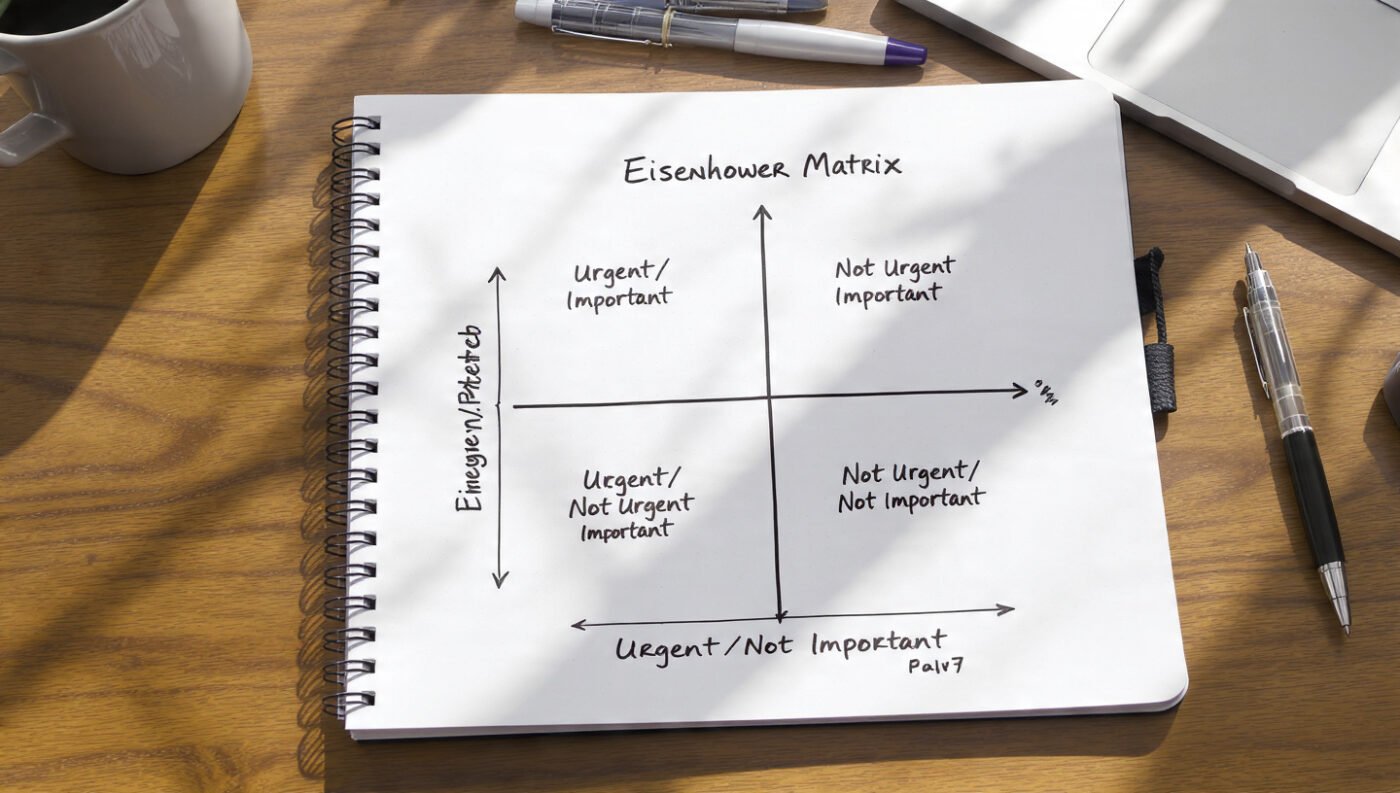
The most proven and widely used systems are compared below. Each one was reviewed based on what it solves, who it fits best, and where it tends to break down.
1. Getting Things Done (GTD)
Developed by David Allen, GTD is built around a five-step process: Capture, Clarify, Organize, Reflect, and Engage. Every task, idea, and commitment is captured into a trusted external system — so nothing lives in your head. Then each item is clarified into a concrete next action and organized into the right list.
In our testing, GTD was the most comprehensive system available. It handled complex multi-project work better than anything else. However, it was also the most demanding to set up and maintain.
Best for: Professionals managing multiple projects and responsibilities.
2. Pomodoro Technique
Developed by Francesco Cirillo, the Pomodoro Technique breaks work into 25-minute focused intervals separated by 5-minute breaks. After four intervals, a longer 15–30 minute break is taken.
When our team tested this over extended writing sessions, the forced break structure was found to prevent the cognitive fatigue that accumulates during long uninterrupted work. The hardest part was not the 25 minutes of focus. It was stopping at the break and resisting the urge to keep going past the timer.
Best for: Procrastinators, beginners building focus habits, anyone whose biggest challenge is starting.
3. Time Blocking
Time blocking assigns specific calendar slots to specific categories of work. Instead of reacting to what comes up, you decide the night before or Sunday evening when deep work, admin, email, and meetings will happen.
According to Aftertone’s 2026 productivity method comparison, time blocking handles scheduling at the macro level — protecting important work from reactive demands before the day starts. In practice, our team found time blocking to be the single most powerful system for protecting deep work from interruption.
Best for: Creative workers, writers, researchers, and anyone who struggles to protect focused time.
4. Eisenhower Matrix
The Eisenhower Matrix sorts all tasks into four quadrants: Urgent + Important (do now), Not Urgent + Important (schedule), Urgent + Not Important (delegate), and Not Urgent + Not Important (eliminate).
It is less a daily execution system and more a prioritization filter. When used before any other system, it ensures the work you are doing is actually the right work.
Best for: Anyone who feels constantly reactive, or who finds their day consumed by urgent but unimportant tasks.
5. Eat the Frog
Attributed to Mark Twain’s quote — “If it’s your job to eat a frog, it’s best to do it first thing in the morning” — this method starts every day with the single most important, most dreaded task first.
Our observation from applying this daily: starting with the hardest task builds a momentum that makes everything after it feel easier. Nothing compares to having your most important work finished before 10 AM.
Best for: Procrastinators, and anyone whose day tends to derail before the most important work gets done.
6. Bullet Journaling
Bullet journaling is an analog productivity system using a notebook with a custom index, rapid logging of tasks and events, and regular weekly and monthly reviews. It is deeply customizable and works on paper — no apps required.
Best for: Detail-oriented, analog thinkers who prefer pen and paper over digital tools.
7. Kanban
Kanban uses three visual columns — To Do, In Progress, and Done — to track the flow of work. It is one of the most straightforward systems available, and its visual nature makes it especially useful for teams.
Best for: Teams, visual thinkers, and project-based workers who need to see the status of all work at a glance.
8. Inbox Zero
Inbox Zero is a system for processing email to an empty inbox every day by applying four actions to every message: delete, delegate, respond, or defer. It eliminates the cognitive load of an overflowing inbox and prevents email from becoming a default to-do list.
Best for: Professionals whose primary daily overwhelm comes from email volume.
Best Productivity Systems
What Does Research Say About Productivity Systems?
The most robust finding across productivity research is that no single system works best for all people or all work types. What the research consistently shows is that the most effective personal productivity approach combines elements from multiple systems.
Aftertone’s 2026 GTD vs Time Blocking vs Pomodoro comparison — one of the most thorough published in 2026 — concluded that the most productive people use a layered system: GTD for capturing and organizing commitments, Time Blocking for scheduling when work happens, and Pomodoro for executing focused work within those blocks. Each layer handles what the others cannot.
Furthermore, Success Odyssey Hub’s 2026 research confirms that productivity systems fail most often not because of the system itself, but because the practitioner never defines what “productive” actually means for their role. Before any system is chosen, knowing your primary output — whether that is writing, client calls, research, or creative work — is essential.
In our own practice, the most consistent productivity gain was observed not from switching systems, but from committing to one primary system for a minimum of 30 days before evaluating results. Productivity systems require time to internalize before they produce visible improvement.
“The most productive system is not the most sophisticated one. It is the one you follow long enough to make it automatic.”
How to Choose the Right Productivity System for You

The right system depends on three things: your work type, your biggest daily challenge, and how much structure you naturally enjoy.
Step 1 — Identify your biggest daily challenge
-
Can’t start tasks? → Pomodoro or Eat the Frog
-
Can’t protect focus? → Time Blocking
-
Overwhelmed by volume? → GTD
-
Working on wrong priorities? → Eisenhower Matrix
-
Buried in email? → Inbox Zero
-
Working in a team? → Kanban
Step 2 — Start with one system for 30 days
Do not combine systems on day one. Pick the one that addresses your single biggest challenge and use it for 30 days. After 30 days, evaluate what is working and layer in one additional system if needed.
Step 3 — Build the layered system over time
The most productive practitioners end up using a three-layer approach:
-
Capture layer (GTD) — Nothing is forgotten
-
Schedule layer (Time Blocking) — Important work is protected
-
Execution layer (Pomodoro) — Focus is maintained during each block
That combination handles everything from full project management down to the 25-minute work interval.
Important consideration
Prialto’s systems guide is clear on one point: a productivity system must fit your natural tendencies, not fight them. If you hate digital tools, Bullet Journaling outperforms any app. If you love structure, GTD will click. If you need simplicity, Eat the Frog and a basic time block is enough.
“The system you choose should reduce the effort of getting started — not add to it.”
Techniques: How to Get the Most From Any Productivity System
These techniques were found to increase the effectiveness of any system, regardless of which one is being used.
1. Do a weekly review every Sunday
GTD makes this explicit, but it applies to every system. Spend 20–30 minutes reviewing what got done, what did not, and what the top three priorities are for the coming week. Without the review, any system drifts within two weeks.
2. Write tasks as next physical actions
“Work on project” is not a task. “Write the introduction paragraph of the report” is a task. A task is defined as the next single physical action you will take. That specificity is what removes hesitation and makes starting easy.
3. Protect one deep work block every morning
Before email and messages are checked, one focused 60–90 minute block on your single most important task is used. In our testing, this single habit produced more daily output than any individual system. The morning hours are the highest-cognitive-quality hours for most people. Use them for real work.
4. Limit your daily priority list to three items
Everything on your list matters. But not everything matters equally. Choose three tasks daily that, if completed, would make the day a success. Everything else is secondary. That constraint forces clarity and prevents the list from becoming a source of anxiety.
5. Time-box email to twice a day
Email is processed at 10 AM and 4 PM only. Outside those windows, the inbox is closed. That single constraint was found to recover 60–90 minutes of real work time daily.
6. Use the two-minute rule
If a task will take less than two minutes, it is done immediately. It is not added to a list. It is not scheduled. It is handled now. That rule prevents small tasks from accumulating into a pile that creates mental clutter.
7. End every day with a shutdown ritual
Spend the last 10 minutes of work writing tomorrow’s three priorities, reviewing open loops, and declaring the workday complete. Research shows that writing tomorrow’s tasks before finishing today reduces intrusive thoughts about work during evening hours — a finding confirmed in cognitive psychology research.
“Productivity is not about being busy for eight hours. It is about being deliberate for the two or three hours that actually produce your best results.”
5 Questions About Productivity Systems
1. Which productivity system is best for beginners?
For beginners, Eat the Frog combined with a simple Time Blocking schedule is the most accessible starting point. It does not require learning complex software, a long setup, or a methodology overhaul. You identify your most important task the night before, do it first thing in the morning, and block the rest of your day in 90-minute sections. That alone produces a measurable improvement in daily output within one week.
2. Is GTD still worth using in 2026?
Yes — but it is rarely used in its pure form. GTD’s value is in its capture and clarify philosophy: getting everything out of your head and into a trusted system. That principle has never become less useful. In 2026, most effective GTD practitioners use a simplified version — capture, next action, weekly review — without the full system architecture David Allen describes.
3. Can you combine productivity systems?
Yes, and that is actually recommended. The most effective approach is to layer systems at different levels: GTD for capture and organization, Time Blocking for scheduling, and Pomodoro for execution. Each layer handles a different question: what to do, when to do it, and how to focus while doing it. The key is to build the layers one at a time, not all at once.
4. What productivity system works best for students?
Students typically benefit most from a combination of Time Blocking for study sessions, Pomodoro for focused study intervals, and a simple weekly review to align upcoming deadlines. Notion Adam’s student productivity system research adds two important components: active recall and spaced repetition within the learning system — not just task management, but memory-optimized study scheduling.
5. Why do productivity systems stop working after a few weeks?
Three reasons are seen most often. First, the system is too complex to maintain when life gets busy. Second, the weekly review is skipped, which causes the system to drift and lose trust. Third, the system was chosen for how it looked rather than how it fit the actual work being done. The fix is: simplify the system, protect the weekly review, and make sure the system serves your actual work type.
Final Thoughts
After reviewing, testing, and applying the best productivity systems across different work types, one conclusion stands clearly: the system that works is the one that fits your real life, not the one that sounds most impressive.
GTD is powerful for complex, multi-project professionals. Pomodoro is the fastest system for building focus habits from scratch. Time Blocking protects the deep work that produces your best output. The Eisenhower Matrix keeps you working on the right things. And Eat the Frog builds the daily momentum that makes everything else easier.
None of these systems require a perfect morning, a spotless desk, or an ideal set of circumstances. They require only one thing: consistent use.
Start with the system that solves your biggest challenge. Use it for 30 days before judging it. Add one layer only after the first is automatic.
The goal is not to have the best system. The goal is to have the right system — and to actually use it.
“You do not need ten productivity systems. You need one that fits you, used every day, reviewed every week.”
FAQ
Q: What is the single best productivity system?
There is no single best system for everyone. GTD is best for complex project management, Pomodoro is best for focus and procrastination, and Time Blocking is best for protecting deep work. Most top performers use a combination of all three at different levels.
Q: How do I know which productivity system to choose?
Identify your single biggest daily challenge: if it is starting tasks, use Pomodoro; if it is protecting focus, use Time Blocking; if it is managing many projects, use GTD; if it is prioritizing, use the Eisenhower Matrix.
Q: How long does it take for a productivity system to work?
Most systems require a minimum of 30 days of consistent use before they become automatic and produce clear results. Switching systems before 30 days is the most common reason they fail.
Q: Is the Pomodoro Technique scientifically proven?
The Pomodoro Technique is supported by cognitive science research on attention, fatigue, and performance — specifically the finding that regular breaks prevent cognitive fatigue and maintain consistent performance better than long uninterrupted sessions.
Q: What productivity system do top performers use?
Research from LifeHack Method’s analysis of top performers shows they most commonly use a hybrid: GTD-style capture, Time Blocking for daily scheduling, and either Pomodoro or Deep Work for execution. Eat the Frog is used consistently as a morning ritual before any system takes over.